

Let’s take a look at a real-world scenario that I ran into a few weeks ago with a family friend. For the sake of this story, let’s call him Bob. Bob lost access to a pretty important online account.
Bob had mentioned that he wasn’t able to log in to his Facebook account anymore and was wondering if I could help him. Bob is a pretty savvy guy. He’s been using computers for decades for his job in sales and for running his own business. His kids got him a new tablet for Christmas - a Surface, which runs Windows 10, because his kids knew he’d be comfortable with it.
Bob got his new tablet, ran through the setup process, and tried logging into Facebook, only to not remember his password. He’s been used to his Facebook account remaining logged in on his computer for so long that he couldn’t remember the password. No big deal.
This is where he was at when he asked for my help, so I said sure thing.
Restoring a Forgotten Password
I asked Bob if he had tried clicking the “Forgot account?” link when trying to log in. That gives you a few options to reset your password. Facebook made him go through and prove that it was him - he had to look at some pictures of contacts and match them with their names. Since some of his Facebook friends didn’t use photos of themselves, but instead had pictures of their kids, this was a bit of a challenge for Bob. He had gone through the process but never received an email, so he figured he was stuck.
I walked him through this and, according to Facebook, we gave enough correct answers to generate the password reset email. We logged into Bob’s Gmail account, but that email didn’t show up. That’s when we determined that his Facebook account was tied to Bob’s old Hotmail email account.
I said, “Alright Bob, let’s just log into that Hotmail account, the email should be there.”
Bob replied, “I’m not sure I know the password for that either, usually I’m just logged in on my work computer.”
The Plot Thickens
This makes the situation a little trickier. Fortunately, Hotmail (which now redirects to Microsoft’s online Outlook email service) has its own ways to get back in, provided that the information on the account is up-to-date. I was able to get an automated phone call from Microsoft because Bob’s home phone number was on the account.
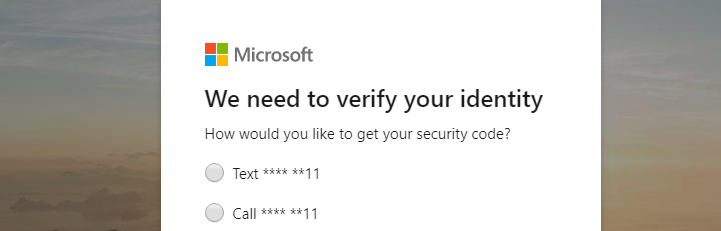
Microsoft gave me a 6-digit security code and I was able to reset Bob’s Hotmail email, get to the Facebook reset password email, and reset his Facebook password.
I then helped Bob go into his Facebook account and add his Gmail account as an alternative email. You can do so by going to your Settings > General > Contact and clicking Add another email or mobile number.
Crisis averted, and Bob was grateful! Unfortunately, that’s when I realized that Bob had bigger problems.
There Was a Lot More at Stake Than Just Facebook
Before closing everything and passing the tablet back to Bob, I noticed that his Hotmail account had emails from his bank and his domain registrar (Bob owned a few domains for some local properties that he manages and one for a veterans site he is a part of).
I said, “Hey Bob, it’s really a good thing we got you access again to your Hotmail account - it’s tied to your bank and some other important stuff!”
I was pretty shocked and concerned for Bob, but he shrugged and said something along the lines of, “Well, that’s why I have you.”
I was flattered of course, but later that evening, Bob and I sat down at a desktop and went through everything together to secure his accounts. If he had not been so lucky to gain access to that old Hotmail account, or if he somehow got logged out from his work computer, he would have had a hard time getting back into his bank account or his domain registrar.
An Online Account Audit
We scoured through Bob’s Hotmail to find any online service that was tied to it. Essentially anything he was using or purposely subscribed to. We found that his cable subscription, Netflix, his bank, his domain registrar, and a few other accounts were all tied to the Hotmail account.
Bob decided he would rather use his Gmail account for everything, so we took our time and logged into each account, and changed the emails, and while we were at it, we reset the passwords (Bob used the same password on multiple accounts pretty often).
We also set up 2FA or two-step verification on all of the accounts possible, including his Hotmail and Gmail accounts. We made sure each account had his updated address and home phone number, as well as his cell number.
To remember all of these new passwords, we set up a LastPass account, which is one of many password managers. For a single home user, LastPass works great. For small businesses looking to manage their passwords, give Voyage Technology a call at 800.618.9844 to talk about solutions geared for businesses.
We plugged everything into LastPass and set it up on both his desktop and his new tablet. Now Bob can have unique, complex passwords on all of his accounts and not need to remember them or store them on sticky-notes.
It took a few hours, but together we totally cleaned up Bob’s online accounts and made sense of everything, AND we secured everything with strong passwords and 2FA. This is something everyone should do once a year.
Audit Your Online Accounts
In short, here’s a punch list of what we did, so you can repeat it for yourself.
- Log in to each email account you have. Reset the password to something secure and unique.
- Set up 2FA on each email. You can have the 2FA send the code via a text message, but it’s better to use an authenticator app like LastPass, Authy, or Google Authenticator.
- Decide what online accounts you want tied to each email. If you have an old email account you want to gradually decommission, plan on moving all accounts to the email you want to use. It’s a little easier when everything is tied to one email account.
- Log in to each account and confirm that you have it going to the email you want to use.
- While logged in, reset the password, write it down or use a password manager to log it.
- While logged in, setup two-factor authentication/multi-factor authentication/two-step verification if the account allows it. Most banks, social networks, and major websites do offer it.
- Repeat this for every online account. It wouldn’t hurt to scour through your email for older accounts that you don’t use anymore. For example, if you used to have an account with an older cable company, update your email within that account as well, and then delete the account if you no longer need it.
Expect to spend a few hours doing this, especially if you haven’t done it at all over the years. When you are all done though, you’ll be in good shape and never run into an issue where you can’t access something important.


